
WIX Harmony Editor: A Designer’s Perspective After 5 Years Working in WIX
- Jan 29
- 3 min read
I’ve been working with Wix for over five years now. Long enough to remember when it was dismissed as “not serious enough” for high-level design work, and long enough to see how consistently that assumption has been proven wrong.
A week ago, I was given early access to the new WIX Harmony Editor. Instead of treating it like a feature announcement or a shiny new AI tool, I approached it the same way I approach any new system: with a real brief, real expectations, and a healthy level of scepticism.
What I found wasn’t a replacement for designers. It was something more interesting than that.

Watching WIX Grow From the Inside
When you work deeply inside one platform for years, you start to notice patterns. You see whether updates are reactive or intentional. Whether new tools feel bolted on, or whether they actually integrate into a broader system.
WIX’s evolution over the past few years has been deliberate. Not louder. Not trend-chasing. Just structurally better.
From a designer’s point of view, the most important shift hasn’t been visual polish. It’s been creative freedom at scale. The ability to build websites that are interactive, expressive, and genuinely bespoke—without fighting the platform.
This matters particularly for my clients around Liverpool and Widnes, where many businesses want agency-level quality without the agency-level friction. WIX Studio has already been delivering that. Harmony feels like the next layer.
What Is the WIX Harmony Editor, Really?
Harmony is WIX’s new AI-assisted editor designed to generate live, editable website layouts based on a brief. Not static mockups. Not inspiration boards. Actual, publishable pages that exist inside the WIX ecosystem. That distinction matters.
Most AI website tools stop at “concept.” Harmony goes further by producing layouts that already respect WIX’s structure, components, and logic. That’s what makes it usable—not just impressive.
But rather than reading about it, I wanted to test it properly.
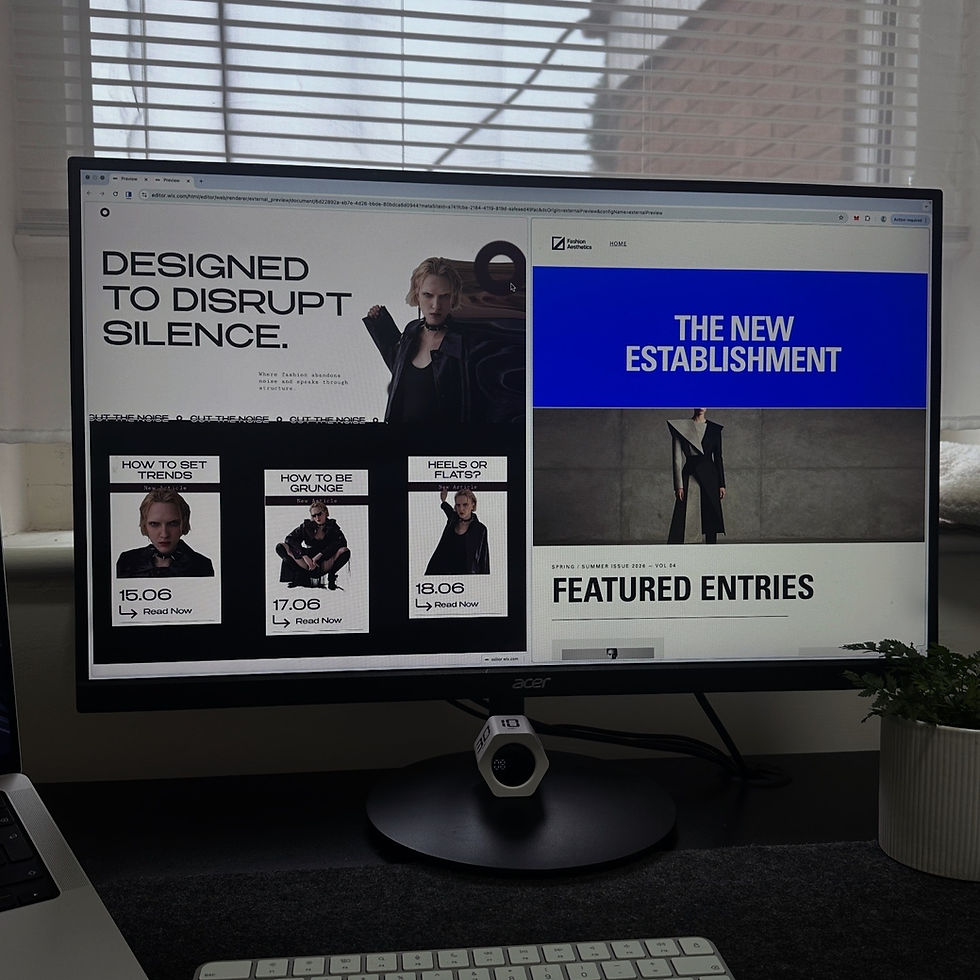
The Brief I Gave Harmony (And Myself)
At the time I opened Harmony, I was low on inspiration. That’s usually when tools either collapse or prove their value.
So I set a challenge. I gave Harmony the same brief I would give myself:
Editorial fashion magazine website
Brutalist foundations
Minimalist structure
Swiss-style typography discipline

Website brief for WIX Harmony Editor
This is not an easy combination. It’s the kind of brief that exposes weaknesses fast.
When Harmony finished generating the site, my reaction wasn’t shock—it was quiet surprise. The result wasn’t perfect, but it was remarkably close to something I could refine and publish without starting from zero.
And that’s the key point.
Why Harmony Isn’t a Threat to Designers
There’s a lot of noise around AI “replacing” creative roles. From where I’m standing, Harmony does the opposite. It removes the blank page.
Instead of spending hours laying out structure before real design thinking begins, Harmony offers a starting point that already understands hierarchy, spacing, and flow within WIX Studio.
For designers and WIX developers, this is not a competition. It’s acceleration.
Used well, Harmony becomes:
A fast ideation tool
A layout exploration engine
A reference point when inspiration stalls
Used badly, it’s just another template generator. The difference lies entirely in the hands using it.
Creative Freedom, Not Creative Dilution
One of the biggest misconceptions about WIX - especially from outside the ecosystem -is that creativity is somehow limited by the platform.
That hasn’t been true for years.
I’ve proven repeatedly, through client projects, that WIX Studio sites can be:
Highly interactive
Visually bold
Editorial and expressive
On par with agency-level builds
Harmony doesn’t reduce that freedom. It supports it.
It gives designers a way to test ideas faster, validate layout directions, and move into refinement sooner. The human judgement—the part that makes a site feel intentional—still matters just as much.
Where Harmony Still Needs to Grow
Harmony isn’t finished. And that’s a good thing. Right now, its strongest use case is inspiration and acceleration, not final decision-making. There’s still room for improvement in nuance, edge cases, and deeper brand sensitivity.
But as a designer, I don’t expect tools to think for me. I expect them to support my process, and Harmony does that.
Final Thoughts
After five years inside WIX, I don’t get excited easily by new releases. Harmony earned my attention not because it’s AI-powered, but because it fits into a bigger picture.
It’s not trying to replace designers. It’s trying to remove friction.
And in a creative industry where time, clarity, and focus are everything, that’s a meaningful addition.
If this is the direction WIX continues to move in, the platform’s growth over the next few years will be just as interesting as the last.
Quietly impressive. Consistently evolving. And increasingly capable of supporting serious design work.
Comments